
Effortless Button Design with CSS3 Generator
Overview
The software is a dedicated CSS3 button generator designed to simplify the creation of visually appealing buttons for web projects. It enables users to customize key visual properties such as background gradients, solid colors, font styling, borders, and shadows—essential elements for modern web design. The tool is ideal for front-end developers, UI/UX designers, and web creators who need to quickly prototype or implement button styles without writing CSS from scratch.
By offering a streamlined interface, the application allows users to adjust settings through intuitive controls and instantly see visual feedback. Once the desired look is achieved, the final step is to click a button to generate and copy the corresponding CSS code directly into their project files. This workflow reduces development time and minimizes manual coding errors.
The target audience includes both beginners exploring web design and experienced developers seeking efficiency. The tool supports multiple operating systems, making it accessible across Windows, Mac, and Linux environments. Its lightweight nature—5.4 MB—suggests minimal system impact, suitable for use on a variety of hardware configurations.
Key Features & Capabilities
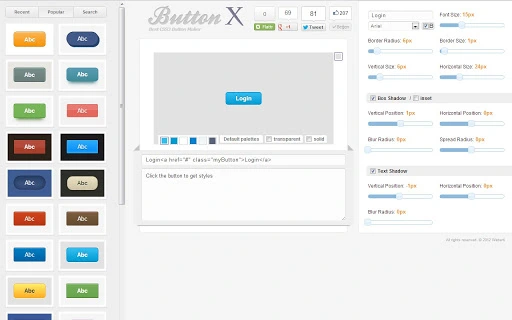
- Real-time CSS3 styling – Adjust background gradients, solid colors, and transparency with immediate visual updates.
- Font customization – Modify font color, size, style, and weight to match brand or design requirements.
- Border controls – Set border color, width, and corner radius for modern, polished button shapes.
- Advanced effects – Apply box shadow and text shadow using CSS3 properties for depth and visual interest.
- One-click code generation – Copy generated CSS code instantly for direct integration into web projects.
- Design preview – View changes in real time to ensure visual accuracy before exporting code.
For example, a designer can create a vibrant gradient button with soft shadow effects and a bold font, then copy the entire CSS block in seconds. This functionality accelerates prototyping and enhances consistency across web interfaces. The tool is particularly useful during rapid design iterations or when implementing responsive button styles across different screen sizes.
User Interface, Workflow & Performance
The user interface is designed around simplicity and direct interaction. The layout centers on a visual button preview area, with control panels for adjusting CSS properties. Navigation is minimal, focusing on core functions: setting visual attributes and generating code. The workflow follows a logical sequence: configure, preview, copy—ideal for users seeking speed and clarity.
Based on general software behavior patterns, the application likely maintains responsive performance during configuration. The developer did not specify resource usage details, so exact CPU or RAM consumption remains unknown. However, the 5.4 MB installation size suggests a lightweight footprint, which typically correlates with efficient operation and low system load.
Stability is expected to be consistent for basic use cases, as the tool focuses on a single, well-defined task. No external dependencies or cloud services were mentioned, implying full functionality can be achieved offline. The absence of complex rendering pipelines further supports reliable operation across supported platforms.
Compatibility & System Requirements
The software is compatible with Windows, Mac, and Linux operating systems, making it accessible to a broad user base across different computing environments. It runs on the latest versions of these platforms, though specific version numbers were not provided.
The installation size is listed at 5.4 MB, indicating a compact footprint suitable for systems with limited storage. The developer did not specify exact system requirements such as minimum RAM, processor speed, or disk space beyond the file size. As such, general compatibility is assumed for standard desktop configurations.
Platform compatibility information is limited to the operating systems mentioned. No details were provided regarding hardware acceleration, GPU support, or integration with development environments. Users should expect a standalone desktop application experience without reliance on web browsers or external plugins.
Pros and Cons
Pros
- Simple, intuitive interface ideal for quick button design
- Real-time visual feedback during customization
- One-click generation of clean, copy-paste-ready CSS code
- Supports modern CSS3 features including gradients and shadows
- Lightweight at just 5.4 MB
- Available at no cost (FREE)
Cons
- No advanced export options (e.g., multiple formats or templates)
- Limited to button styling—no support for other UI elements
- Exact system requirements were not listed
- Does not include version history or update notifications
Is this tool compatible with all major operating systems?
Yes, the software is designed to run on Windows, Mac, and Linux systems. Specific version compatibility was not provided by the developer.
Is the software safe to download and use?
The application is distributed as a standalone desktop tool with no known external dependencies. It does not require internet access to function, reducing potential security risks.
Can I use this tool offline?
Yes, the software operates fully offline. No cloud services or online features are required for core functionality.
What type of license does this software use?
The software is available for free use. No licensing details were provided beyond the free availability.
How often is the software updated?
Specific update frequency was not disclosed. The current version is 1.0, released on May 15, 2024.
Final Thoughts + CTA
For developers and designers focused on efficient web design workflows, this CSS3 button generator delivers a focused, no-frills solution. Its ability to generate clean, ready-to-use CSS code with real-time visual feedback makes it a valuable utility for rapid prototyping and consistent styling. While limited in scope to button design, it excels within its niche.
The free price point and cross-platform availability enhance its accessibility. Despite missing advanced features like templates or export formats, its simplicity and lightweight nature make it a reliable addition to any web development toolkit.
Download CSS3 Button Generator Tool now







